How to Set Up IKEA HomeKit With the DIRIGERA Hub (2026)


One of the most regrettable things in smart device experience is to have an incompatible device. For Apple users, the chances are very high. Especially the ones who expect to add IKEA Tradfri devices to Apple HomeKit. Anyway, the problem is not going to last any longer. Let's find the best solutions for IKEA HomeKit integration.
Possible Ways to Create IKEA Apple HomeKit Integration
If you want to control IKEA devices with Home App and Siri, you need to add IKEA smart devices to Apple HomeKit first. Here are the best and possible ways to add your IKEA Tradfri smart home devices to Apple HomeKit.
- AddToHomeKit [Recommended Solution]
- ATH Bridge [Affordable solution]
- HOOBS
- HomeBridge
AddToHomeKit [Recommended Solution]
IKEA AddToHomeKit is an easy way to add your IKEA smart devices to Apple HomeKit. Ever wondered how to control your IKEA with the Home App and Siri voice control? This is an ideal solution for you. You can find this awesome tool using the button below.
AddToHomeKit is a third-party software solution to connect any HomeKit-incompatible device to Apple HomeKit. It provides web and app solutions to integrate HomeKit IKEA, and control with Siri. AddToHomeKit offers HomeKit configuration plugins and step-by-step guides, and provides recommended software solutions and recommended hardware solutions to integrate IKEA devices with Apple Home.
ATH Bridge [Affordable Solution]
ATH Hub is one of the most affordable hardware solutions for adding Tradfri IKEA devices to Apple's HomeKit. With the ATH bridge, you can easily connect your IKEA smart devices to HomeKit and control them with Siri and the Home app. Also, this small device acts as an IKEA HomeKit bridge.
Here are some of the benefits of using ATH Bridge to add IKEA devices to the Home app:
- Affordable: Most affordable hardware solutions for adding IKEA devices to Home app
- Easy to use: Even if you're not a techie, you'll be able to get up and running quickly.
- Versatile: ATH Hub is compatible with over 2,000 devices
HOOBS Solution
Another hardware solution for adding these devices to HomeKit is HOOBS. If you want easy-to-use home automation, HOOBS is the perfect option for you. More than 2000 gadgets are connected to HomeKit through it.
HomeBridge
HomeBridge is the best and most effective method for adding any smart home device to Apple HomeKit. It is a lightweight NodeJS server that allows you to integrate non-HomeKit compatible smart devices with Apple HomeKit.
TRADFRI Gateway
You need a web-connected hub to control and manage Ikea’s Smart Plugs, Lighting products, Electric Blinds, and more. IKEA HomeKit Gateway allows you to control and manage all of these devices using the IKEA App or a smart home assistant such as Apple HomeKit, Amazon Alexa, and Google Assistant.
Setting up the Tradfri Gateway HomeKit is as simple. Also, you can select which voice assistant you want to control your Ikea devices during the initial setup. Further, it works as an Ikea Home kit Hub and Tradfri remote Home Kit. But Tradfri Gateway is not compatible with the Matter protocol. So, you won't be able to create IKEA Tradfri Matter integration.
Let’s see how to add your IKEA device to Apple HomeKit using the Tradfri smart hub.
New Dirigera Hub
This new Dirigera smart hub will be Matter-supported. The Matter is a new smart home interoperability standard. It promises to enable device communication across all ecosystems and manufacturers.
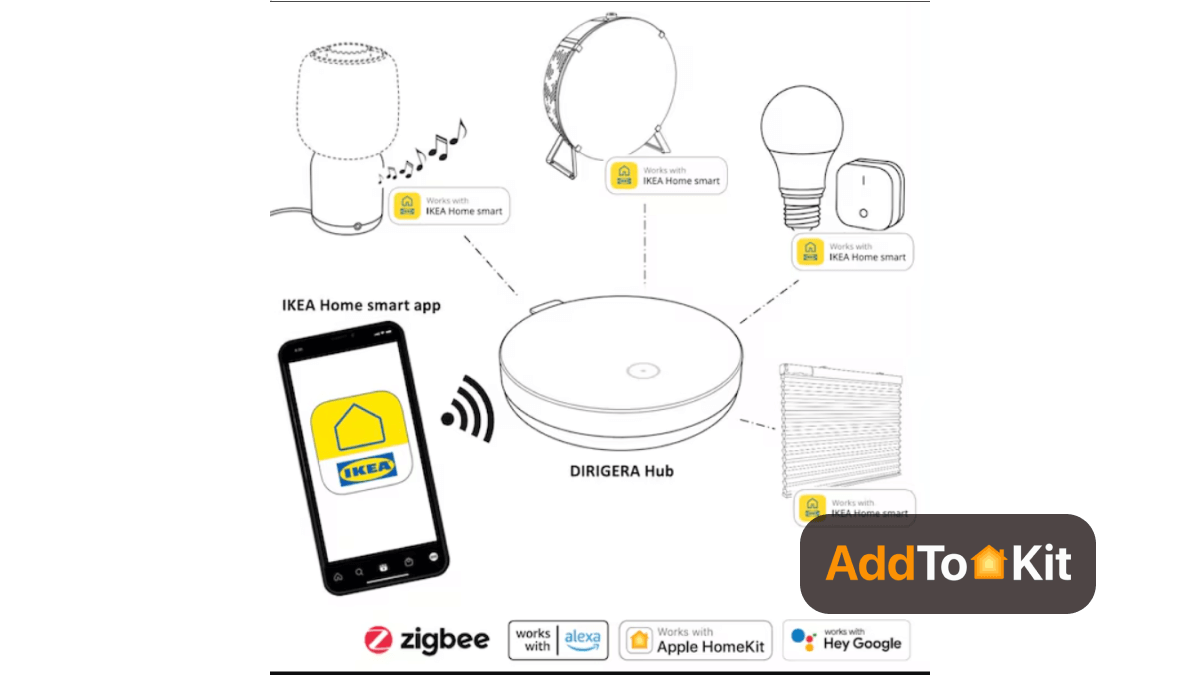
Any IKEA product plugged into the hub can be controlled through any ecosystem that supports Matter. Ecosystems like Apple, Google Assistant, Amazon Alexa, and more have committed to supporting Matter.
Want to know more about the Dirigera Hub? Let’s find out more about the Matter support IKEA HomeKit Hub.
We have given three device methods to add your IKEA devices to Apple HomeKit. If you are interested in the IKEA Home Kit, you can choose the best solutions to improve your Apple HomeKit IKEA and add any devices to HomeKit. Also, if you're an Alexa user, you'll be able to create IKEA Dirigera Alexa and IKEA Drigera Google Home integration.
IKEA And HomeKit Compatibility
Most IKEA smart home devices don’t support Apple HomeKit. But don't worry! Your IKEA smart devices support Apple HomeKit when you use the Tradfri Gateway. Also, you can use third-party software applications and simple device solutions.
- TRADFRI is compatible with all major smart home platforms including Apple HomeKit.
- IKEA has introduced a new Matter-ready Smart Home Hub.
- Reolink Duo(battery)
- You can integrate IKEA Apple using this new Dirigera Smart Home Hub.
Apart from IKEA devices, if you're interested in the eufy smart home devices, you can learn more about adding eufy devices with Apple HomeKit using this guide.
Troubleshooting Tips
- Ensure Compatibility
- Only IKEA devices with Matter support or an IKEA Dirigera hub work natively with the Home app.
- If using IKEA Trådfri Gateway, it does not support the Home app anymore; use Matter or a Dirigera hub instead.
- Check Network & Hub Connection
- Ensure the IKEA Dirigera hub is powered on and connected to your Wi-Fi router via Ethernet.
- Make sure your iPhone and Dirigera hub are on the same 2.4GHz Wi-Fi network (avoid 5GHz if setup fails).
- Restart your router, IKEA hub, and iPhone to clear connection issues.
- Use the IKEA Home Smart App
- Open the IKEA Home Smart app and update firmware for the hub and devices. Try resetting the hub if issues persist: Press and hold the reset button for 5+ seconds until the light blinks.
- Scan the Correct Code
- Use the Apple Home QR code on the IKEA Dirigera hub (not individual devices).
- If scanning fails, enter the code manually in the Home app.
- Reset & Re-add Devices
- Remove the device from IKEA Home Smart app, reset it, and re-add it before trying Apple Home.
- To reset an IKEA bulb, turn it on/off six times in a row until it blinks.
- For IKEA switches/remotes, press and hold the pairing button for 10 seconds.
- Try Bridge Alternatives
- Use a third-party bridge with the appropriate plugin.
- Check iOS & Home App
- Ensure your iPhone is updated to the latest iOS version.
- Try removing the IKEA hub from the Home ap and re-adding it.
If your IKEA device doesn't support Matter, you can:
Adding IKEA Devices to the Apple Home App Using HomeBridge
- Install Homebridge on Mac/PC
- Install IKEA HomeBridge Plugin
- Edit the configuration file
- Run the plugin
- Bridge to HomeKit
- Then, go to the Home App on your Apple devices.
- Scan the QR code of Homebridge UI.
- Finally, you can control the devices on Apple HomeKit.
Before installing the necessary and apprpriate Homebridge plugin, you need to install HomeBridge on Mac/PC. Check this article to install Homebridge on your device easily.
First you need to install homebridge-ikea-tradfri-gateway using the below code:
$ sudo npm install homebridge-ikea-tradfri-gateway -gAlso, you can try this code if you’re having a permission problem
$ sudo npm install homebridge-ikea-tradfri-gateway -g --unsafe-permConfigure your JSON file with the below platform:
{
"bridge": {
"name": "Trådfri",
"username": "AA:22:3D:E3:CE:57",
"port": 51826,
"pin": "031-45-123"
},
"description": "This is an example configuration file",
"platforms": [
{
"platform": "Ikea Trådfri Gateway",
"name": "Ikea Trådfri Gateway",
"securityCode" : "this-is-found-on-the-back-of-the-gateway",
"expose": ["lightbulbs", "outlets", "blinds"]
}
]
}
This module automatically determines the IP address of the IKEA portal. If for some reason you need to access a specific portal then merge the following into the code. Go to the ~/.homebridge/config.json file.
{
...
"platforms": [
{
...
"host": "ip-address-of-ikea-gateway"
}
]
}
Credit - https://github.com/meg768/homebridge-ikea-tradfri-gateway
First, navigate to the directory using: cd..
Then, run the ikea plugin using:
homebridge -D -U ./config/ -P ./Now, you can control your IKEA devices with Apple HomeKit after connecting homebridge to HomeKit.
Troubleshooting Tips for IKEA HomeKit HomeBridge
- Check HomeBridge & Plugin Status
- Ensure Homebridge is running and the IKEA plugin. (e.g,
homebridge-tradfri-gatewayis installed and up to date. - Restart HomeBridge and check logs for errors.
- Verify IKEA TRÅDFRI Gateway Connectivity
- Make sure the IKEA TRÅDFRI Gateway is powered on and connected to your network.
- Check the IKEA Home Smart app to confirm devices are working properly.
- Restart the gateway by unplugging it for 30 seconds and plugging it back in.
- Ensure HomeKit Code & Pairing Are Correct
- If IKEA devices are not appearing in HomeKit:
- Check Network Issues
- Ensure Homebridge and the IKEA Gateway are on the same network.
- Restart your router if devices are not responding.
- If using HomeKit remotely, make sure Home Hub (Apple TV, HomePod, or iPad) is working.
- Update Firmware & Software
- Update IKEA TRÅDFRI firmware via the IKEA Home Smart app.
- Update Homebridge and installed plugins.
- Review Homebridge Logs
- Look for error messages related to IKEA devices.
- Reinstall the IKEA Plugin
- Remove the HomeBridge IKEA plugin:
- Reinstall it:
- Restart HomeBridge.
- Reset IKEA Gateway
- Press and hold the link button (⚫) for 10 seconds.
- Wait for the LED to blink.
- Set up the gateway again in the IKEA app and Homebridge.
- Remove and re-add them in Homebridge.
- Make sure the HomeKit pairing code in the plugin configuration is correct.
homebridge -D
If the IKEA devices are still unresponsive:
npm uninstall -g homebridge-tradfri-gateway
npm install -g homebridge-tradfri-gateway
If all else fails, reset the IKEA TRÅDFRI Gateway:
If you own HomeKit incompatible Smart Devices like Ring, you can find our How to add Ring Devices to HomeKit article to make them compatible with Apple HomeKit.
How Do You Connect IKEA DIRIGERA to Apple HomeKit?
What you need:
- IKEA DIRIGERA hub with the included Ethernet cable, USB cable and power adapter
- The IKEA Home smart app on your iPhone or iPad
- The Home app on the same iPhone or iPad
- A HomePod mini, HomePod or Apple TV 4K set up as your home hub
- IKEA smart devices you want to control
For more on how the hub works with Matter, see our IKEA DIRIGERA hub guide.
- Connect power and Ethernet: Plug the supplied Ethernet cable into your router and the hub, then power DIRIGERA with the USB cable and adapter.
- Set up the hub in the IKEA Home smart app: Open the IKEA Home smart app, tap Get started and follow the on-screen prompts until the app finds your hub.
- Add your IKEA devices: Pair your IKEA lights, plugs, remotes and sensors to the hub in the IKEA Home smart app. Only devices on DIRIGERA will show up in Apple HomeKit.
- Update the firmware: Make sure DIRIGERA is on the latest firmware. Older firmware may not show the Matter pairing option.
- Get the Matter code: In the IKEA Home smart app, go to Settings, tap your hub, open Integrations and select Pair using a code. Copy the code or keep the QR code on screen. [NEEDS VERIFY: exact menu labels in the current app]
- Add DIRIGERA in the Home app: Open the Home app, tap +, then Add Accessory. Scan the QR code or enter the pairing code, then assign each IKEA device to a room.
- Use one connection path only: If you already connected DIRIGERA to Apple HomeKit through another integration, remove that first. Using two paths at once makes every IKEA device appear twice in the Home app.
What About IKEA's New Matter-over-Thread Devices?
Since January 2026, IKEA has been releasing more than 20 smart devices that use Matter over Thread, including bulbs, buttons, remotes and air quality sensors. These devices can join Apple HomeKit directly through a HomePod mini or Apple TV 4K, with no IKEA hub required.
Still Using a TRÅDFRI Gateway?
The older TRÅDFRI gateway runs on the IKEA Home smart 1 app and does not support Matter. You can still bring TRÅDFRI devices into Apple HomeKit by running a Homebridge server with an IKEA TRÅDFRI plugin, as shown above. For a plug-and-play option, ATH Bridge is a pre-configured Homebridge server for HomeKit, not a Matter bridge.
Integrating to HomeKit with HOOBS
IKEA Tradfri Gateway Plugin for HOOBS exposes the devices connected to a Tradfri IKEA Gateway to HOOBS. This HOOBS plugin extracts all light bulbs, outlets, and blinds in use by the IKEA Gateway. So, it can convert your smart home devices into IKEA Home Kit devices.
This plugin supports:
- Standard White Bulbs
- RGB Bulbs
- Warm white bulb with temperature control
- Outlets
- Blinds
You must first connect to your router using an Ethernet cable. Next, you need to plug in the power cord and wait for two to three minutes for HOOBS to boot into the Box.
You should now launch the browser on your computer and go to http://HOOBS.LOCAL. The Home app on your iPhone can be launched after creating your HOOBS account.
Then tap Add accessory to scan the QR code. You need to tap Add again after that, and it has been successfully added. Then click on Plugins and install the Ikea plugin. Select the search option IKEA and click "Install Plug-in."
Add this configuration code:
[
{
"platform": "Ikea Trådfri Gateway",
"name": "Ikea Trådfri Gateway",
"securityCode" : "this-is-found-on-the-back-of-the-gateway",
"host": "ip-address-of-ikea-gateway",
"expose": ["lightbulbs", "outlets", "blinds"]
}
]
New launcher- Matter supports IKEA HomeKit Hub (DIRIGERA Smart Hub)
The DIRIGERA Hub is the heart of a smart home system. It enables you to connect and manage your smart home appliances using the IKEA Home smart app. All of their smart products work independently. Further, the DIRIGERA Hub needs a Wi-Fi network and connects to your router with the supplied cable.
By connecting them to the hub:
- Control and personalize your home in new ways
- When you combine two or more items, you can access additional features and functionality.
- You can use shortcut buttons, the app, or schedules to manually trigger scenes, like when you want to quickly turn off all the lights in your smart home before you leave in the morning.
Home Assistant IKEA Dirigera Integration
You're able to add your IKEA Dirigera Hub to Home Assistant. First, you need to remove the Dirigera bridge from the Apple Home app, and then it becomes discoverable in Home Assistant. Also, you should have a notification in the Home Assistant app/Web interface that it found a new HomeKit controller.
But, you will not be able to create integration of Homey IKEA Dirigera with Homey Pro Bridge, as Homey is not supported.
HomeKit-compatible devices
IKEA added HomeKit support to some devices. So, you can make IKEA's most affordable devices even more powerful. The following IKEA Products support HomeKit.
01. IKEA Tradfri Shortcut Button
Tradfri Shortcut Button acts as a dedicated controller. Keep a shortcut button by the bed. So, you can turn on the lights, draw the shades, and play your favourite wake-up song with the push of a button. So, it's time to create the right light to start your morning with the IKEA HomeKit Button.
Control your smart home with:
- IKEA Home Smart App
- Remote Controls
- Shortcut Buttons
- Voice commands
- Motion
02. IKEA Motion Sensors
You can use the IKEA Motion Sensor to automatically turn on/off up to 10 lights. So, you can make your home safer. It upgraded to firmware 1.13.21. So, you can see it in the Apple Home App.
- Can set functions for day or night mode
- Lights automatically turns off
- Has a maximum range of 10 metres
Best IKEA Smart Home Devices
At a glance, we can find there are several best Ikea smart home hubs, the best Ikea smart lights, the Best IKEA smart blind, the Tradfri Motion sensor, and many more best Ikea smart home gadgets like smart plugs and smart speakers. And, you can integrate these solutions with Apple HomeKit easily.
01. Tradfri Gateway
You need a web-connected hub to control and manage IKEA’s many smart plugs, lighting products, electric blinds, and more. It allows you to control and manage all of these devices using the Ikea app or a smart home assistant such as Apple HomeKit, Amazon Alexa, and Google Assistant. Also, it is powered by Zigbee.
Setting up the Tradfri Gateway is simple:
- Connecting the hub to your router.
- Downloading the Ikea smart home app.
- Follow the on-screen steps to activate the portal.
- Select which voice assistant you want to control your Ikea devices during the initial setup.
02. Tradfri LED Bulbs
Want to brighten up your home? Tradfri LED E12 450 lumen is the best solution for you. Also, it is the best IKEA Bulb and you can integrate with Apple HomeKit using Tradfri Gateway or any other solutions.
Using the Tradfri remote and the Home app, it allows you to choose:
- Between nine different colours.
- Many warm and cool tones.
03. IKEA Fyrstur Blackout Roller Blinds
You can control how much sunlight you’re letting into your home using your smartphone or IKEA remote control. Like competitive smart blind manufacturers, IKEA's selection of smart blinds is the best roller blinds with an integrated battery pack.
Once connected to your Tradfri Gateway or any compatible smart hub, you can operate your blinds with the Home Smart App or a voice assistant.
04. Tradfri Smart Plug
Wish your coffee maker, desk fan, and dehumidifier were all automatic? Then, you can buy Tradfri Smart Plug, which is the best smart plug for your IKEA smart home. Also, you can use physical on/off switches and timers to operate up to 10 different smart plugs at once, connected to your Tradfri gateway or another hub.
05. Symfonisk Table Lamp
Symfonisk Table Lamp is AirPlay 2-compatible and works as the best IKEA Smart Speaker. Also, it allows you to wirelessly transfer music from your mobile device to the speaker if you're using Apple HomeKit. Although Symfonisk lacks compatibility for Alexa or Google Assistant, you can still operate the speaker with Alexa using a Sonos One or Beam.
- Control one item, group, room, or all at once.
- Both the Ikea Home Smart and Apple Home apps allow you to apply actions to shortcut buttons with cumulative results.
- Easy to integrate the IKEA Shortcut Button HomeKit.
06. IKEA ZigBee
Now, this is not a device but rather a protocol that allows HomeKit compatibility.
IKEA's smart lighting products utilize Zigbee Light Link technology, allowing compatibility with other Zigbee-certified devices. You can easily integrate additional TRADFRI bulbs, light panels, and sensors into your system using the TRADFRI app and gateway. Moreover, IKEA's smart lighting supports voice control through Apple HomeKit and Amazon Alexa, making it versatile for smart home setups.
IKEA Alexa
Adding IKEA to Alexa can be done by enabling the Amazon Alexa integration in the IKEA smart home app and the IKEA smart skill in the Alexa app. Doing so would allow you to control your IKEA devices with Alexa voice commands.
How to Add IKEA to Alexa
- Navigate to the IKEA home app >> Setting menu.
- Follow the given instructions to activate Alexa.
- Go to the Alexa app and enabke the IKEA Home smart skill.
- Discover the devices by saying, "Alexa, discover my devices" or with the Alexa app.
Conclusion
As we mentioned above, IKEA devices can be added to Apple HomeKit with simple solutions. My suggestion is to go with AddToHomeKit as it is easy to use. Also, it removes the limitation of Homebridge. And, if you want to go with an affordable solution, you can use ATH Bridge to add your IKEA devices to Apple HomeKit easily.
Frequently Asked Questions
Yes. IKEA smart devices work with Apple HomeKit through the DIRIGERA hub, which connects to the Home app using a Matter pairing code. Newer IKEA Matter-over-Thread devices can also pair directly. Older TRÅDFRI setups can connect through bridges such as Homebridge or ATH Bridge.
Connect your DIRIGERA hub to your router and set it up in the IKEA Home smart app. Go to Settings, tap your hub, open Integrations and generate a Matter pairing code. Then open the Home app, tap Add Accessory and scan or enter the code to finish pairing.
Open the IKEA Tradfri App, tap Settings, go to Integration, select Apple HomeKit, get the IKEA Tradfri connection code, and enter it in the Apple Home app.
Yes. You can use Tradfri with a remote steering device such as a remote control, wireless dimmer, or motion sensor for basic local control.
It depends on the device. IKEA's newer Matter-over-Thread devices can join Apple HomeKit directly with a HomePod mini or Apple TV 4K as the home hub. Older IKEA Zigbee devices need the DIRIGERA hub, or a TRÅDFRI gateway paired with Homebridge or ATH Bridge.
You can add your IKEA bulbs to HomeKit natively through the DIRIGERA hub, or connect legacy bulbs using a hardware bridge like ATH Bridge to control them with Siri.
You can connect IKEA smart blinds to Apple HomeKit using the DIRIGERA hub. For non-hub setups or older models, you can use AddToHomeKit or ATH Bridge as an easy alternative.
Through its built-in Matter bridge and Zigbee support, DIRIGERA integrates across Apple Home, Google Home, Amazon Alexa, and SmartThings ecosystems.